App Store competitor analysis: a step-by-step guide
Define the market with a keyword, read the top 50, compare screenshots and in-app purchase tiers, mine reviews for gaps, then write a one-page gap brief.
- Publisher
- AppGapFinder
- Published
- Reading time
- 12 min read
App Store competitor analysis means reading the apps that already rank for the keyword you want to win: their listings, screenshots, prices, in-app purchases and public reviews. Done in six steps, it ends in a one-page gap brief: what to match, what to build, what to avoid. This guide walks through all six on one real keyword, with the numbers.
What App Store competitor analysis is, and is not
It is a qualitative read of one keyword’s competitive set. You answer four questions: who ranks, what they promise, what they charge, and what their users complain about. The inputs are all public: the App Store search results for the keyword, each listing’s metadata and screenshots, its in-app purchase list, and the review feed Apple publishes for every app.
It is not rank tracking (watching positions move week by week), not download or revenue estimation (modelled numbers sold by market-intelligence suites), and not keyword research in the sense of search volumes, which Apple does not publish. Those are different jobs with different tools. Competitor analysis is the hour you spend before deciding whether, and how, to build.
Step 1: Define the market with a keyword
Start from the search term your future users would type, not from a list of apps you happen to know. The apps that rank for that term are your competitors whether or not you have heard of them, and the list usually includes two groups you would otherwise miss: small apps that rank well on a narrow promise, and large general apps that rank for the term without being built for it.
Pick the storefront you plan to launch in. Results, prices and often screenshots differ by country, so a German analysis is not a US analysis with the currency changed.
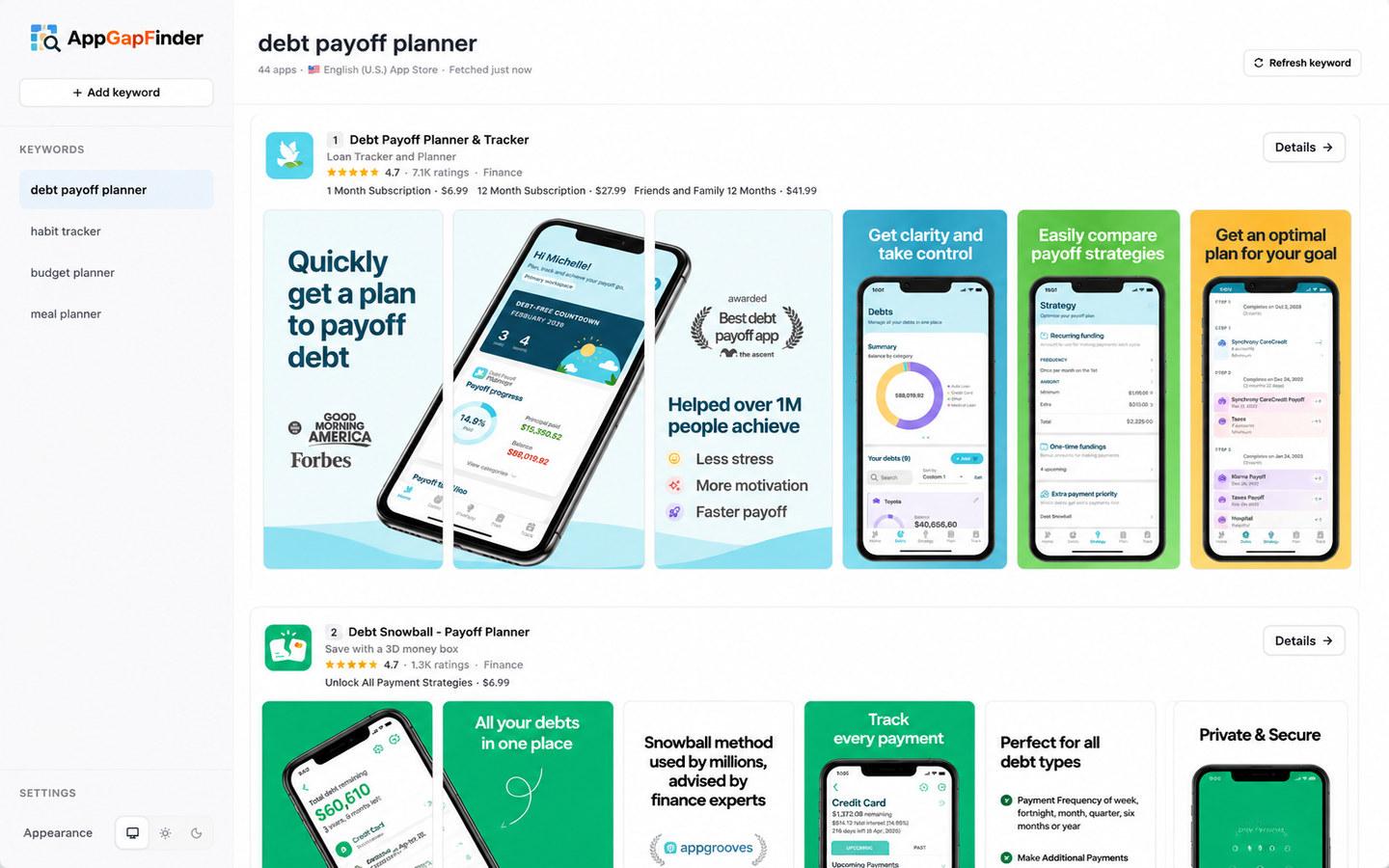
The worked example. Keyword debt payoff planner, United States storefront, read on 18 October 2026 at 13:13 UTC with AppGapFinder, which returns up to 50 results. Apple returned 46 apps for this term. Everything below comes from that one result; you can reproduce it by adding the same keyword, although the numbers will have moved.
Step 2: Read the ranking set
Before opening any app, read the list as a whole. Four counts tell you most of what you need about the market:
- How many results, and how many are new. 46 apps rank for the term; 25 of them were first released in 2025 or 2026. The market is still being entered.
- How ratings are distributed. 28 of the 46 apps have fewer than 50 ratings and 21 have fewer than 10. Six have none. Attention is concentrated in a handful of apps.
- Who is a specialist and who is not. Four of the top ten (EveryDollar, Rocket Money, Fleur and YNAB) are general budgeting apps. The six debt-specific apps in the top ten hold 16,891 ratings between them; Rocket Money alone holds 400,147.
- Which words the market has settled on.17 of the 46 titles contain the exact phrase “debt payoff planner”, and “snowball” appears in 8 titles or subtitles, 4 of them in the top ten.
| # | App | Rating | Ratings | Price model (all free to download) |
|---|---|---|---|---|
| 1 | Debt Payoff Planner & Tracker | 4.7 | 7,377 | Subscription: $6.99 a month, $27.99 a year, $41.99 a year for family |
| 2 | Debt Snowball - Payoff Planner | 4.7 | 1,380 | One-time unlock: $6.99 |
| 3 | Debt Payoff Box: Snowball Plan | 4.5 | 2,453 | One-time unlock: $9.99 |
| 4 | EveryDollar: Budget Management | 4.7 | 84,153 | Subscription: $12.99 and $17.99 a month, $79.99 a year (general budgeting app) |
| 5 | Changed: Automate Debt Payoff | 4.6 | 5,629 | No in-app purchases listed |
| 6 | Debt Guide - Payoff Planner | 4.8 | 49 | Subscription: $9.99 a month, $39.99 a year; lifetime $79.99 |
| 7 | Rocket Money - Bills & Budgets | 4.5 | 400,147 | Subscription: $4.99 to $6.99 (general budgeting app) |
| 8 | Fleur - Budget Planner App | 4.8 | 13,057 | Lifetime: $9.99 to $25.99 (general budgeting app) |
| 9 | YNAB | 4.8 | 61,914 | Subscription: $14.99 a month, $109 a year (general budgeting app) |
| 10 | Debt Payoff Tracker & Planner | 5.0 | 3 | Lifetime: $9.99 |
Two reads follow from the table. First, a new entrant competes with three debt-specific apps that have 1,000 to 7,500 ratings, not with Rocket Money; the general apps rank for the term but are not what someone searching it wants. Second, an app with 3 ratings sits at position 10, so the lower half of the top ten is open to a well-made newcomer. Turning these counts into a build-or-not decision is the job of the app idea validation guide, which scores demand, dissatisfaction and feasibility for the same keyword.
Step 3: Compare listings and screenshots
Apple gives every app the same small canvas: a name of up to 30 characters, a subtitle of up to 30 characters, up to 10 screenshots, and up to 3 app previews. In search results, only the first one to three screenshots are visible, depending on orientation, so those three carry the listing. Subtitles may not reference other apps or make unverifiable claims (App Review Guideline 2.3.7), and screenshots must show the app in use, not title art (Guideline 2.3.3).
Read the top ten’s subtitles and first three screenshots side by side and write down the promise each one leads with. In the example, the debt-specific apps lead with a method (“Debt Free Snowball Calculator”, “Snowball Calculator & Tracker”, “Loan Tracker and Planner”) and the general apps lead with breadth (“Track Income, Bills & Spending”, “Subscription & Expense Manager”). Nobody in the top ten leads with speed of setup, privacy, or a one-time price, which are three positions a newcomer could take.
For a closer look at captions, device framing and localization, pull the screenshots into a folder: the screenshots guide covers the three ways to do that.
Step 4: Compare pricing and in-app purchases
The price model is the decision users complain about most, and it is visible before you install anything: every listing publishes its in-app purchase names and prices. Read them for the whole ranking set, then look for the empty cell.
In the example, 45 of the 46 apps are free to download; the only paid download is a $0.99 app at position 33. Among the top ten, the models split three ways: monthly and annual subscriptions (positions 1, 4, 6, 7 and 9), one-time unlocks between $6.99 and $9.99 (positions 2, 3 and 10), and lifetime tiers (positions 6 and 8). Annual prices for the debt-specific apps run from $27.99 to $39.99. The empty cell is a debt-specific app with a clear one-time price above $9.99 and no subscription, which is also the exact thing several low-star reviews in the next step ask for.
AppGapFinder reads the in-app purchase tiers for the first 12 results of a keyword and shows the price and tiers again in each app’s detail view, so this step is a scroll rather than ten listing visits. The full read of all 46 apps’ tiers for this keyword, with medians and a CSV, is in what debt payoff apps charge.
Step 5: Mine reviews for gaps
Listings show what is promised; reviews show what is delivered. Collect the recent public reviews of the three to five apps that matter (the top three, the one with the most ratings, one fast-rising newcomer), keep the one-to-three-star reviews, sort each complaint into a fixed list of themes, and count. The full method, with the theme list and the weighing rules, is in the guide on finding feature gaps in competitor reviews; here is what it produced for the example.
For the position-one app, the tool returned the 60 most recent US reviews (three pages, April 2025 to September 2026). 36 were five-star and 21 were one to three stars. Those 21 sorted into five themes:
| Theme | Reviews | Bucket |
|---|---|---|
| Paid tier: access after paying, features moved behind the paywall, unclear value | 6 of 21 | Pricing and subscriptions |
| App would not open, froze, or lost data | 5 of 21 | Reliability |
| Could not edit or delete debts, or record an extra one-off payment | 4 of 21 | Missing feature |
| Payoff plan or balance maths felt wrong | 4 of 21 | Accuracy |
| Screens felt cluttered or complicated | 2 of 21 | Design |
The five-star reviews of the same app praise two things above all: running what-if scenarios and watching the payoff date and interest move when an extra payment is added. That is the table stakes line: a competing app that cannot do it convincingly will not get credit for anything else. The position-two app’s older reviews (18 in the sample, 2019 to 2024) repeat two of the themes, reliability and the inability to record extra payments, which makes those two cross-app signals rather than one developer’s bad month.
Treat the sample as a sample. Apple’s public feeds expose a recent slice, people write when they are angry or delighted, and 60 reviews is enough to see repetition, not to quote percentages with confidence.
Step 6: Write the one-page gap brief
Everything above compresses into one page. The template has four lines; the example fills them in.
- Market in one sentence.46 apps rank for “debt payoff planner” in the US; three debt-specific apps with 1,000 to 7,500 ratings hold the top, four general budgeting apps fill the middle, and 25 entrants since 2025 have mostly stayed under 50 ratings.
- Match first.What-if scenarios with extra payments that visibly move the payoff date and interest; snowball and avalanche methods, since “snowball” is the vocabulary the market uses.
- Build. Editing and deleting debts and payments without friction; one-off extra payments; a free tier that clearly says what Premium adds; a one-time price option above $9.99 with no subscription.
- Avoid. Moving existing features behind a paywall after launch; paywalls before the first payoff plan is shown; any setup that users have to redo when something fails to save.
Keep it to one page. Three gaps that users complain about every month beat a roadmap of twenty, and the brief is something you can re-check in an hour when the listings change. If the question is still whether to build at all, run the brief through the validation scoresheet first.
Common mistakes
- Starting from competitor names instead of the keyword, and missing the general apps and the newcomers that actually share your search results.
- Reading one storefront and assuming the others look the same. Prices, subtitles and screenshots are localized.
- Counting complaints without a denominator. Six reviews out of 21 low-star reviews mean something different from six out of 200.
- Treating old complaints as current. Check dates and versions; the position-two app’s sample ends in 2024.
- Skipping the praise. What users love about the leader is the price of entry, not an optional extra.
- Doing it once. Listings and prices change; the example in this guide will be out of date within months, which is why every number here carries its date.
Doing this for free, or with a paid suite
Everything in this guide uses public App Store data, so it can be done by hand with the App Store app and a spreadsheet. AppGapFinder, which publishes this guide, does the collecting: the top 50 for a keyword in any of 49 storefronts with ratings, prices, in-app purchase tiers and screenshots, public reviews from 18 countries with filters by country and star rating, and an optional AI gap analysis that runs on your own OpenAI, Claude or Gemini key. It is free and needs no account. It does not estimate downloads or revenue, track ranks over time, or cover Google Play; paid ASO suites do those jobs, and the home page lists what the tool does and does not do.
Frequently asked questions
How often should I redo an App Store competitor analysis?
Before you commit to building, again before launch, and then whenever a competitor ships a major update or your rank moves. Because the method is a one-hour read, a quarterly repeat is realistic for a solo developer.
How many competitors should I look at?
Read the whole ranking set for the counts in step 2, then go deep on three to five: the top three, the app with the most ratings, and one newcomer that ranks well with few ratings.
Does this work for Google Play?
The method does; the tool does not. Google Play search results, listings and reviews are also public, but AppGapFinder covers the Apple App Store only.
What if the keyword has no clear leader?
That is itself a finding. If the top ten is a mix of general apps and tiny ones, as the lower half of the example is, the market has room for a specialist who gets the table stakes right.
Is this the same as ASO?
No. ASO is optimizing your own listing and keywords for search. Competitor analysis is reading the market before and alongside that work, and it feeds ASO with the subtitle patterns and gaps you find.
Sources
- Apple, App Store product page guidance: developer.apple.com/app-store/product-page (30-character name and subtitle, up to 10 screenshots, the first one to three shown in search results, up to 3 previews).
- Apple, App Review Guidelines 2.3.3 and 2.3.7: developer.apple.com/app-store/review/guidelines.
- Apple, Search API documentation (lookup by app id, country parameter, about 20 calls per minute): performance-partners.apple.com/search-api.
- Worked-example data: public App Store listings and review feeds for “debt payoff planner”, United States storefront, read through AppGapFinder on 18 October 2026.
Sources checked on 18 October 2026.