FreeNo accountApple App Store
App Store competitor analysis for indie iOS developers
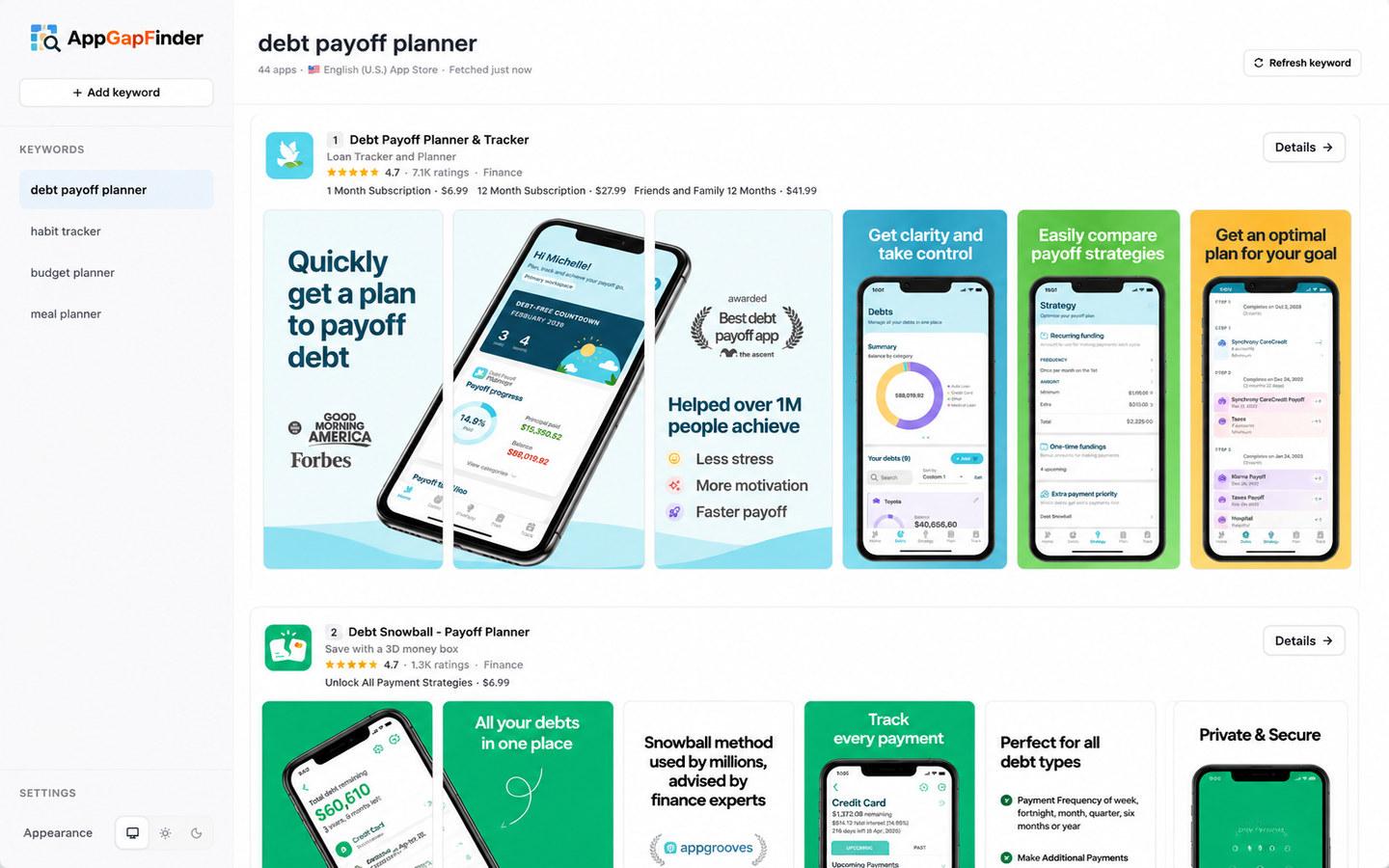
Type a keyword. AppGapFinder pulls the top 50 iOS apps ranking for it and lays out their screenshots, prices, in-app purchases, ratings and public reviews side by side, so you can see the gap before you build.
Runs in your browser. Keywords and results are saved locally. Nothing to install, nothing to sign up for.
What is AppGapFinder?
AppGapFinderis a free web tool that analyzes App Store competitors for any keyword. It fetches the top 50 iOS apps ranking for that keyword in one of 49 App Store storefronts, shows each app’s metadata, screenshots, price and in-app purchase tiers, collects recent public reviews from 18 countries, and can run an AI gap analysis on those reviews with your own OpenAI, Claude or Gemini API key. It covers the Apple App Store only and does not estimate downloads or revenue.
Everything the listing shows, for every app in the result
One keyword returns the whole competitive set. No per-app lookups, no copying prices into a spreadsheet.
The top 50 apps, in rank order
Every app ranking for the keyword, with title, subtitle, category, rating, rating count and price. Refresh any time to take a fresh snapshot.
Every screenshot, downloadable
Full screenshot strips for each listing, a lightbox for the details, and a one-click ZIP of all of an app's screenshots so you can study captions and ordering offline.
Pricing and in-app purchases
The price and the in-app purchase tiers each app sells, side by side. Spot who charges monthly, who sells lifetime, and where nobody offers a free tier.
Public reviews from 18 countries
Recent reviews per country, loaded progressively, with a rating distribution and filters by country and star rating. Fetch older pages for the markets you care about.
AI gap analysis with your own key
Run the review sample through OpenAI, Claude or Gemini using your own API key. You get a verdict, 4 to 7 weak points with approximate mention counts and a quote each, what to do better, and what to avoid.
The developer's other apps
See what else a developer ships, with ratings and prices, and open any of those apps for the same screenshot and review breakdown.
From keyword to gap in three steps
- 1
Add a keyword and pick a storefront
Type the search term your future users would type and choose one of 49 App Store storefronts. AppGapFinder fetches the top 50 results with their metadata, screenshots and in-app purchases and saves them in your browser.
- 2
Compare the listings
Scan the ranked list: who holds the top spots, how they price, which promise each app's first three screenshots make, and where the subtitles overlap. Download any app's screenshots as a ZIP for a closer look.
- 3
Open an app and read the gap
The detail view collects recent reviews from 18 countries, shows the rating distribution and lets you filter by country and stars. Add your own API key to get an AI analysis: the biggest exploitable weakness, weak points with evidence quotes, and what a competing app should do better.
Built for the first hour of a new app
- Indie iOS developers validating an idea before writing code.
- Small teams doing a competitor scan before a redesign or a pricing change.
- Freelancers and agencies preparing a pitch or a market teardown for a client.
- ASO practitioners who need a quick qualitative read of a keyword, not another rank tracker.
Your data stays in your browser
- No account.Keywords and results live in this browser’s local storage. Collected reviews are cached in IndexedDB for seven days.
- Your API key never reaches a database. It is stored in your browser, optionally encrypted with a passphrase, and sent to the provider you chose only for the run you start.
- Only public data is shared. Review pages are cached on our side so the next person looking at the same app does not hit Apple again. They contain public App Store data, nothing about you.
What AppGapFinder is, and what it is not
Paid ASO suites model downloads and revenue, track rankings over time and cover Google Play. AppGapFinder does one job, a qualitative read of one keyword's competitive set, and does it for free.
| Capability | AppGapFinder | Paid ASO suites |
|---|---|---|
| Price | Free, no plan or trial | Monthly subscription, often per app or per seat |
| Account | None. Data stays in your browser | Required |
| Keyword results | Top 50 apps per keyword, 49 storefronts | Varies by plan |
| Screenshots | Full strips, ZIP download per app | Usually shown, rarely downloadable |
| Public reviews | 18 countries, filters, rating distribution | Review monitoring and reply tools |
| AI review analysis | Your own OpenAI, Claude or Gemini key | Built into the plan |
| Download and revenue estimates | Not included | Yes, modelled estimates |
| Rank tracking over time | Not included | Yes |
| Google Play | Not included | Usually yes |
Questions people ask before trying it
Is AppGapFinder free?
- Yes. There is no plan, trial or account. The only cost you can run into is your own AI provider usage if you choose to run an analysis with your API key, and that is billed by the provider, not by AppGapFinder.
Do I need an account?
- No. Everything you add is saved in the browser you are using. Open the same browser on the same device and your keywords are still there; clear the site data and they are gone. There is no sync between devices.
Which App Stores does it cover?
- The Apple App Store only. Keyword search works across 49 storefront locales, from the United States and United Kingdom to Japan, Brazil and India. Reviews are collected from 18 countries plus the storefront you searched. Google Play is not supported.
Where do the reviews come from?
- From Apple's public review feeds, which anyone can read without logging in. AppGapFinder loads the latest page per country first and fetches older pages on request, up to 10 pages per public source. Public feeds do not expose an app's complete review history, so treat the result as a sample.
Do you store my API key?
- Not on any server. The key is kept in your browser, either in plain local storage or encrypted with AES-GCM behind a passphrase you choose. When you start an analysis, the key is passed to the background job for that run only and forwarded to your provider.
Which AI models can I use?
- OpenAI, Anthropic Claude and Google Gemini, with a model picker and a reasoning-effort control per run. The prompt treats review text as untrusted data and asks for concrete, evidence-backed output instead of a general summary.
Is the data real time?
- Keyword results are a snapshot taken when you add or refresh a keyword. Responses are cached briefly on the CDN, and the Refresh button bypasses that cache. Review pages are shared for one hour, so a popular app may show reviews collected a few minutes earlier by someone else.
Can I download competitor screenshots?
- Yes. Every app card has a download button that packs all of that listing's iPhone screenshots into a ZIP file named after the app. Use them for research and comparison; the images remain the developers' copyrighted work.
How to do the research
- How to validate an app idea with App Store reviews
Score demand, dissatisfaction and feasibility from the top apps' rating counts and public reviews, with thresholds and a real keyword example.
- What debt payoff apps charge: prices of 46 App Store apps
We read the in-app purchase tiers of all 46 apps ranking for debt payoff planner in the US App Store: free share, monthly, annual and lifetime prices.
- App Store competitor analysis: a step-by-step guide
Define the market with a keyword, read the top 50, compare screenshots and in-app purchase tiers, mine reviews for gaps, then write a one-page gap brief.
- How to find feature gaps in competitor App Store reviews
Turn competitor App Store reviews into a feature gap list: pull a keyword's top apps, collect reviews by country, group the complaints and weigh them before you build.
- How to download App Store screenshots of any app
Three ways to save any iOS app's screenshots for competitor research: a one-click ZIP per app, the App Store web page, and Apple's public lookup API.
Built by an iOS developer
AppGapFinder is built and maintained by Linas, an independent iOS developer. It exists to make the first competitor-research step of a new app, finding the apps that already rank for a keyword and reading what their users complain about, quick and free. All data comes from Apple’s public App Store listings and review feeds; nothing is scraped from behind a login.